
2.3. Authentication Methods
When security control is enabled in the gateway settings (enabled by default), users must provide authentication information to use protected APIs. If security control is turned off, user authentication can be skipped and all endpoints can be used directly; however, if the IP white list is also enabled, the source IP must still be in the white list (except for /api/auth/login, /api/misc/product-details, and JWT-authenticated requests). See 2.3.3. IP White List for details.
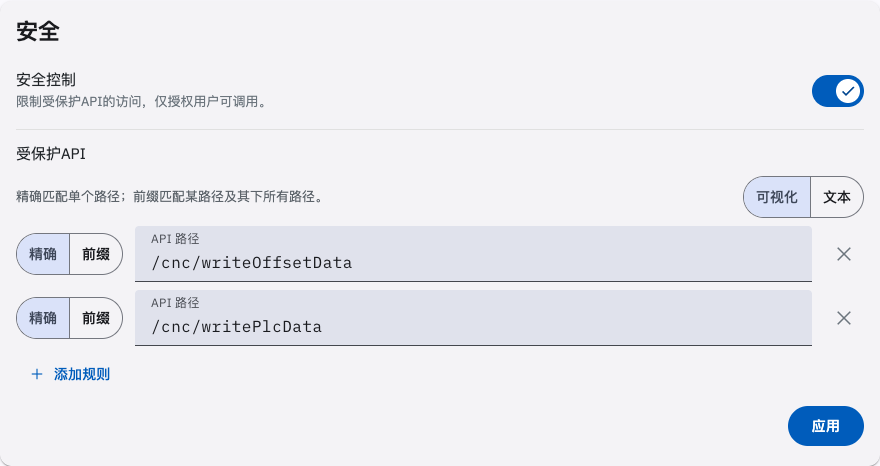
The gateway supports the following two authentication methods: the JWT method and the secret key method.
2.3.1. JWT Method
Section titled “2.3.1. JWT Method”The user logs in with a username and password via the authentication endpoint /api/auth/login to obtain a JWT token for that user. The token is valid for 24 hours; once it expires, the user must log in again to obtain a new token. Include Authorization: Bearer <token> in the request header to use the protected APIs available to that user’s permissions. If the logged-in user has administrator privileges, all endpoints except protected APIs can be used.
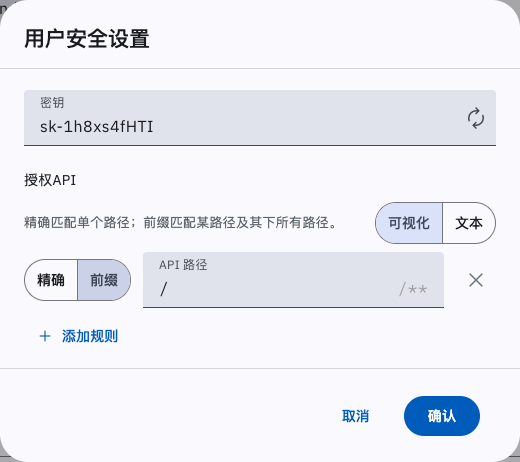
2.3.2. Secret Key Method
Section titled “2.3.2. Secret Key Method”Generate a secret key on the gateway’s Settings > Manage Users > User Security Settings page; the secret key is valid permanently. Include Authorization: Bearer <secret key> in the request header to use the protected APIs available to that user’s permissions. If the logged-in user has administrator privileges, all endpoints except protected APIs can be used.
2.3.3. IP White List
Section titled “2.3.3. IP White List”The IP white list is a second access-control gate, independent of security control. When the HTTP service is enabled and the IP white list is turned on, the source IP of every /api request must be in the white list; otherwise HTTP 401 is returned with errorCode 7 and errorMsg IP not in white list..
The following requests are exempt from the IP white list:
/api/auth/login, the login endpoint;/api/misc/product-details, the product information endpoint;- requests authenticated with the JWT method (
Authorization: Bearer <token>).
Requests authenticated with the secret key method are still subject to the IP white list check.
The white list toggle and address list are described by the enableIpWhiteList and ipWhiteList parameters in 2.9.2. Communication Settings.
2.4. Authentication Endpoints
Section titled “2.4. Authentication Endpoints”Base address for authentication endpoints: /api/auth/.
2.4.1. login
Section titled “2.4.1. login”POST /api/auth/loginExample request body, application/json
{ "username": "username", "password": "password"}| Request Parameter | Type | Description |
|---|---|---|
| username | String | (Required) Username |
| password | String | (Required) Password |
Example response
{ "token": "a2JhbGciOiJIUzI1NiIsInR5cCI6IkpXVCJ9eyJ1bmlxdWV.bmFtZSI6ImFkbWluIiwibmFtZWlkIjoiMSA2LCJpYXQiOjE3NTEyNzMyMDYsImlzcyI6IjElMktVQOctMVRPU0pINC0xV1h"}| Response Parameter | Type | Description |
|---|---|---|
| token | String | (Required) User token. Valid for 24 hours; once it expires, log in again to obtain a new token. |
2.4.2. change-password
Section titled “2.4.2. change-password”This endpoint is only available under the JWT authentication method.
POST /api/auth/change-passwordExample request body, application/json
{ "currentPassword": "currentPassword", "newPassword": "newPassword"}| Request Parameter | Type | Description |
|---|---|---|
| currentPassword | String | (Required) Current password |
| newPassword | String | (Required) New password |
The username is taken from the JWT token in the request header (Authorization: Bearer <token>); it is not passed in the request body.
Example response
{ "errorCode": 0, "errorMsg": "Success"}| Response Parameter | Type | Description |
|---|---|---|
| errorCode | Int32 | (Required) Error code; 0 indicates success. |
| errorMsg | String | (Required) Error message |